 ShareFlow
Free, open, and runs entirely on your LAN
One keyboard and mouse, every PC in the room.
ShareFlow moves your cursor across every machine on your network, shares the clipboard, and sends files straight to another desktop. No KVM switch, no cloud relay, no cables.
Free. No account required.
What ShareFlow does
Seamless edge switching
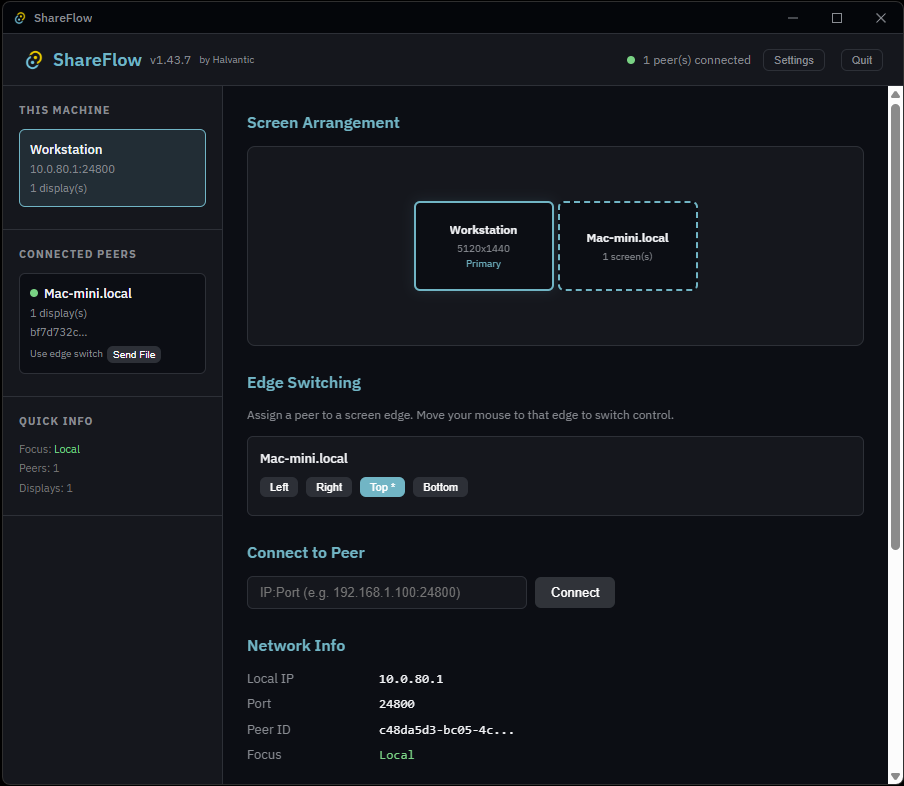
Push your cursor to the edge of one screen and it appears on the next PC over — configured per monitor edge, just like a multi-monitor setup that happens to span machines.
Shared clipboard
Copy on one machine, paste on another. Text and files move with the same shortcut you already use.
One-click file transfer
Pick a file and send it to a discovered peer without opening a share, mounting a drive, or emailing it to yourself.
Automatic peer discovery
ShareFlow finds other machines running it on the same LAN and lists them, ready to connect — no manual IP entry.
Focus indicator, always visible
A banner shows which PC currently has your input, with a one-key return (Scroll Lock) so you never lose track of where your keyboard is pointed.
Runs locally, stays local
No cloud relay and no account. Input, clipboard and file data all stay on your network.